|
The following is an illistration of how I connected my RFID reader to my computer.
January 15, 2011

This is a flow diagram of how I connected my RFID readers to my computer. I really don't know what else to say other than a picture is worth a thousand words.
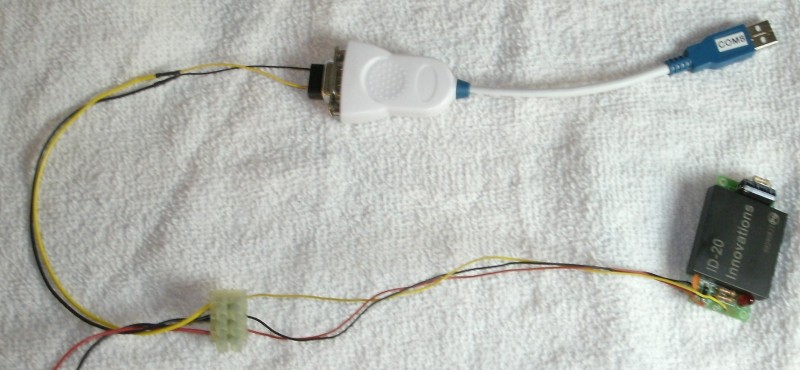
Here is a reader I had wired for testing purposes. This is straight forward. Although a couple side notes. The power supply must be a 5 volt filtered power supply and when running the wire from the reader to the computer I use 18-3 shielded wire. I have not experimented with longer runs(+50 feet) But I think the heavier gauge would be the key to stretching the limits.
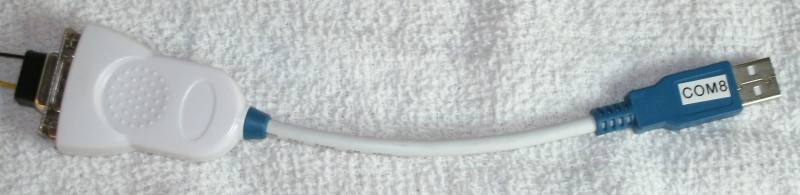
This is the FTDI RS232/USB converter that I use. (FTDI Model# US232-10 Part# ES-U-1001-B10) I like the FTDI Brand over any of the others I tried. The issue I ran into with the others is that if you plug them into a different USB port on your computer they create a new virtual Com port. This creates a couple problems:
1. You have to change the reader COM every time you plug it in.
2. It ties up more Virtual COM spots on the computer.
Now this may have changed over time. The converters that I tried were cheapies that I bought off Ebay. I did most of this work in late 2009 and I am not going to repeat my research.
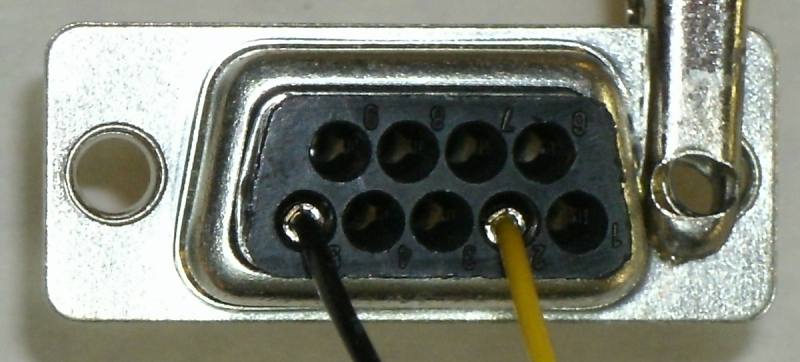
Here is a close up of the wire side of the DB9 connector. The black(ground) wire is connected to pin 5 and the yellow(signal) wire is connected to pin 2. Again, a picture is worth a thousand words.
| |